

Counting calories is only half the battle – if you’re not also hitting the right protein, carb, and fat targets, weight loss gets harder and muscle loss becomes more likely. The right macro tracking app turns that math into a five-second habit instead of a spreadsheet chore.
Table of Contents
This guide compares the apps worth using in 2026, breaks down what actually matters when you’re choosing one, and flags the mistakes that quietly sabotage most people’s tracking streaks.
Quick Answer
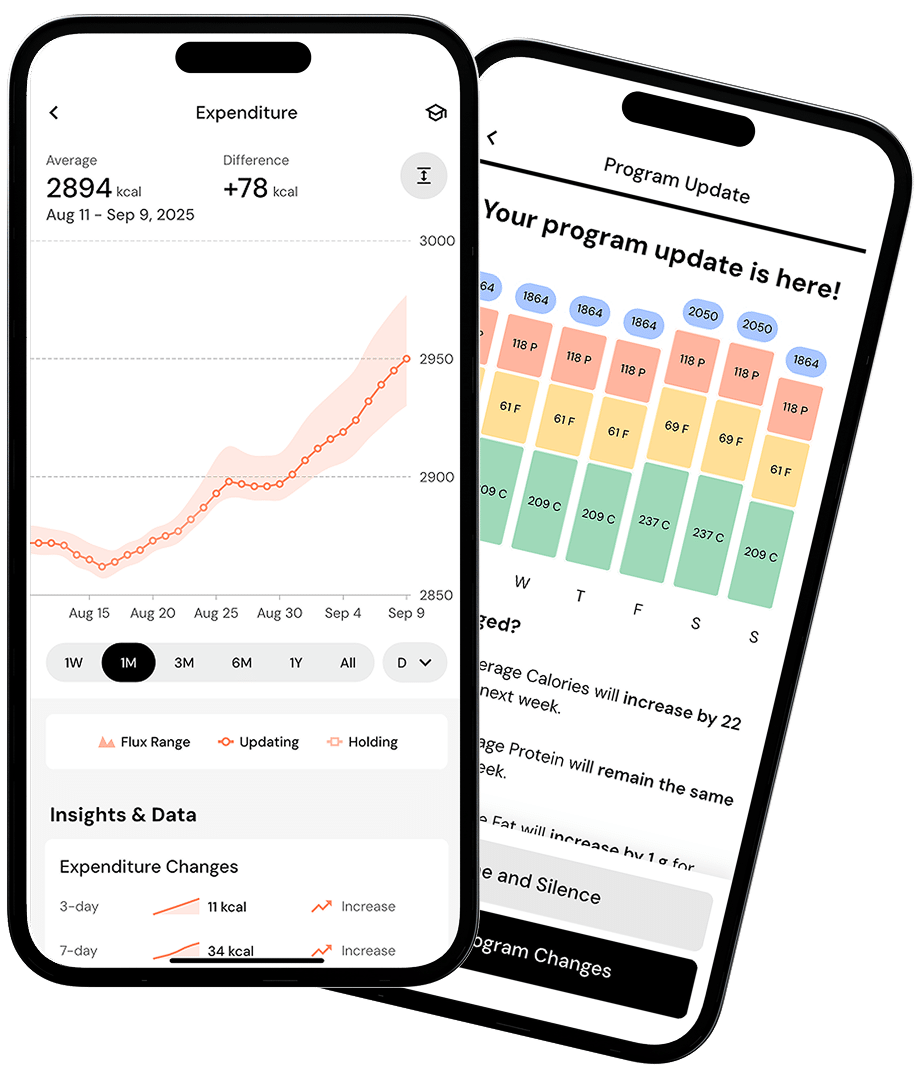
For most people focused on weight loss, MacroFactor is the strongest pick because it recalculates your calorie needs and macro targets automatically based on your real-world results, not a generic formula. If you want a fully-featured free option, Cronometer’s free tier is the most accurate and complete without a subscription.
What to Look for in a Macro Tracking App
Food database quality matters more than app polish. A huge crowdsourced database sounds good, but if entries are inaccurate or duplicated, your macro numbers drift over time – look for apps that prioritize verified or lab-sourced entries and clear labeling of user-submitted vs. verified foods.
Logging speed determines whether you’ll stick with it. Barcode scanning, photo-based food recognition, voice logging, and saved meals/recipes all cut down the friction that causes people to quit tracking after a few weeks – but check whether that logging speed is actually free before you commit to an app, since several major players now gate barcode scanning behind a paid tier.
Adaptive targets beat static ones for weight loss specifically. A plan that only ever uses your starting weight and activity level to set calories will become inaccurate as you lose weight and your metabolism shifts. Apps that adjust your targets based on logged weight trends and actual intake keep you from stalling out on outdated numbers.
Decide how much you care about micronutrients. If you want visibility into fiber, sodium, iron, or vitamin intake alongside macros, prioritize an app built around full nutrient panels rather than just calories, protein, carbs, and fat.
The Top Picks Compared
MacroFactor is built specifically around adaptive coaching: it uses your logged weight and food intake to recalculate your true calorie expenditure and adjusts your macro targets on a rolling basis, rather than relying on a one-time formula. Logging is fast via barcode scanning, AI photo recognition, and a food database with a large set of verified entries, and you can choose Coached, Collaborative, or Manual modes depending on how much control you want. There’s no permanent free tier – it offers a trial period followed by a paid subscription, billed either monthly or at a discount annually.
Cronometer is the best choice if micronutrient accuracy is a priority or you want a genuinely capable free plan. The free Basic tier includes barcode scanning, tracking across dozens of nutrients, and a food database sourced from verified entries like the USDA rather than open crowdsourcing – unlike several competitors, Cronometer has not moved barcode scanning behind a paywall. Cronometer Gold, a paid upgrade billed monthly or annually, adds AI-assisted coaching insights, photo and voice logging, a recipe importer, a macro scheduler, and unlimited history.
MyFitnessPal is the most familiar option and has the largest food database by volume, built mostly from user submissions, which makes it fast to find almost any packaged food but occasionally less accurate than verified-only databases. The free tier covers basic calorie and macro logging, but barcode scanning requires a Premium subscription. Premium adds barcode and meal scanning, ad-free logging, custom macro goals, and an intermittent fasting tracker, while the higher Premium+ tier layers on meal planning and grocery-list syncing with services like Instacart.
Lose It! is a solid pick for beginners who want a guided experience: it sets a personalized daily calorie budget out of the gate, offers a large global food and recipe database, and its free tier covers the basics of logging. Barcode scanning is no longer a given on the free plan – it’s been moved behind Lose It!’s Premium subscription for new users, and even some existing free users have lost access, so don’t assume it’s included without checking your account. A Premium subscription, billed monthly or annually, unlocks barcode scanning, custom macro targets, photo-based logging, and expanded syncing with devices like Fitbit, Garmin, and Apple Health.
Tips and Common Mistakes
Don’t chase database size over accuracy. A bigger database just means more chances to log the wrong entry if it isn’t verified – when in doubt, search for the brand-specific or verified version of a food rather than the first result.
Check what’s actually free before you pick an app based on a feature list you saw online. Barcode scanning in particular has moved behind paywalls in several popular apps over the past couple of years, so confirm current free-tier limits in the app itself rather than assuming older reviews are still accurate.
Recalibrate your targets every few weeks. Whether or not your app does this automatically, your calorie needs change as you lose weight – sticking with your original targets for months is one of the most common reasons weight loss stalls.
Log consistently before you log perfectly. Rough estimates logged every day beat precise entries logged three times a week – the trend data is what your app (and you) actually need to make good adjustments.
Weigh food when you can, especially calorie-dense items like oils, nut butters, and cheese. Eyeballing portions is the single biggest source of tracking error, and it compounds daily.
Treat the first one to two weeks as calibration, not results. Adaptive apps like MacroFactor need a couple of weeks of consistent weight and food logs before their expenditure estimates become reliable.
Explore more: more fitness guides.
macro tracking apps for weight loss FAQs
What is the best free macro tracking app for weight loss?
Cronometer’s free Basic tier is the strongest free option – it includes barcode scanning, tracking across dozens of nutrients, and a verified food database with no calorie logging limits.
Do I need a paid app to track macros for weight loss?
Not necessarily, but check the fine print. Cronometer’s free tier still covers barcode scanning and full macro/nutrient logging. MyFitnessPal has moved barcode scanning behind its paid Premium tier entirely, and Lose It! has done the same for new users (some longtime free users may retain access, but it can’t be assumed) – so the free plans on those two apps cover manual food search and basic calorie/macro logging but generally not barcode scanning.
Is MacroFactor worth the subscription cost?
It’s worth it if you value having your calorie and macro targets automatically adjusted based on your real results rather than a static formula. If you’re comfortable manually adjusting your own targets every few weeks, a free app can get you similar results.
How accurate do I need to be when logging macros?
Consistency matters more than precision. Logging every meal with reasonable estimates, and weighing calorie-dense foods when possible, will get you more reliable results than occasional, highly precise logging.
Make Your Digital Life Better
More practical tech how-tos, tool picks, and guides to upgrade your everyday digital life. More on GTWebs.
Images: MacroFactor.